Hitworkers Tutorial: Launch Your First Campaign in 5 Steps
This site earns a commission if you sign up through its links (Hitworkers affiliate program). Code CHICO5 gives you +5% credits and reduces the commission from 12% to 7% on your account.
What to know before you start
- Campaign creation is a 5-step flow: title, instructions, price, audience, launch.
- You can start from a blank task or pick a ready-made template (TRN, LIN, GEO, MAIL and others).
- A vague brief is the main reason proofs come back messy, not the platform itself.
- A temporary banner we saw on 08/11 lowers the minimum from 30 to 10 workers for 7 days, so the usual starting point may differ once that ends.
- The promo code CHICO5 gives the advertiser +5% credits, which is worth knowing before you type any code in at checkout.
Hitworkers markets itself as a 3-minute setup, and the mechanics back that up. The dashboard copy we saw during testing reads "Create your first task. 3 minutes. Start from a blank task or pick a template," which matches what you actually see once you log in. The five steps are always the same, whether you're buying forum backlinks or a YouTube watch campaign, only the fields inside each step change.
Step 1: Title, what should it say?
The title is internal, workers never see your brand strategy, they see the instructions. Keep it short and functional, something like "Watch + subscribe, tech channel" rather than anything promotional. This is also where you'll want to note your own tracking reference if you're running several campaigns at once, since the dashboard lists campaigns by title.
Step 2: Writing instructions workers can actually follow
This is the step that decides whether your proofs are usable. Vague instructions produce vague proofs, and you can't get a refund for work that technically matches what you asked for but isn't what you meant.
A workable brief answers three questions in plain language: what exact action to take, what counts as proof, and what disqualifies a submission. For example, a backlink task should specify the anchor text rule, where the link should go, and whether a nofollow link is acceptable. A CTR or watch-time task should state the minimum time on page or video, and whether a screenshot timestamp is required. The templates we saw (TRN for YouTube watch and subscribe, LIN for LinkedIn posting, GEO for Google search actions, MAIL for Gmail account creation) each come with a default instruction block, but treating that as a starting draft rather than a final brief is what separates a clean batch of proofs from a pile of disputes.
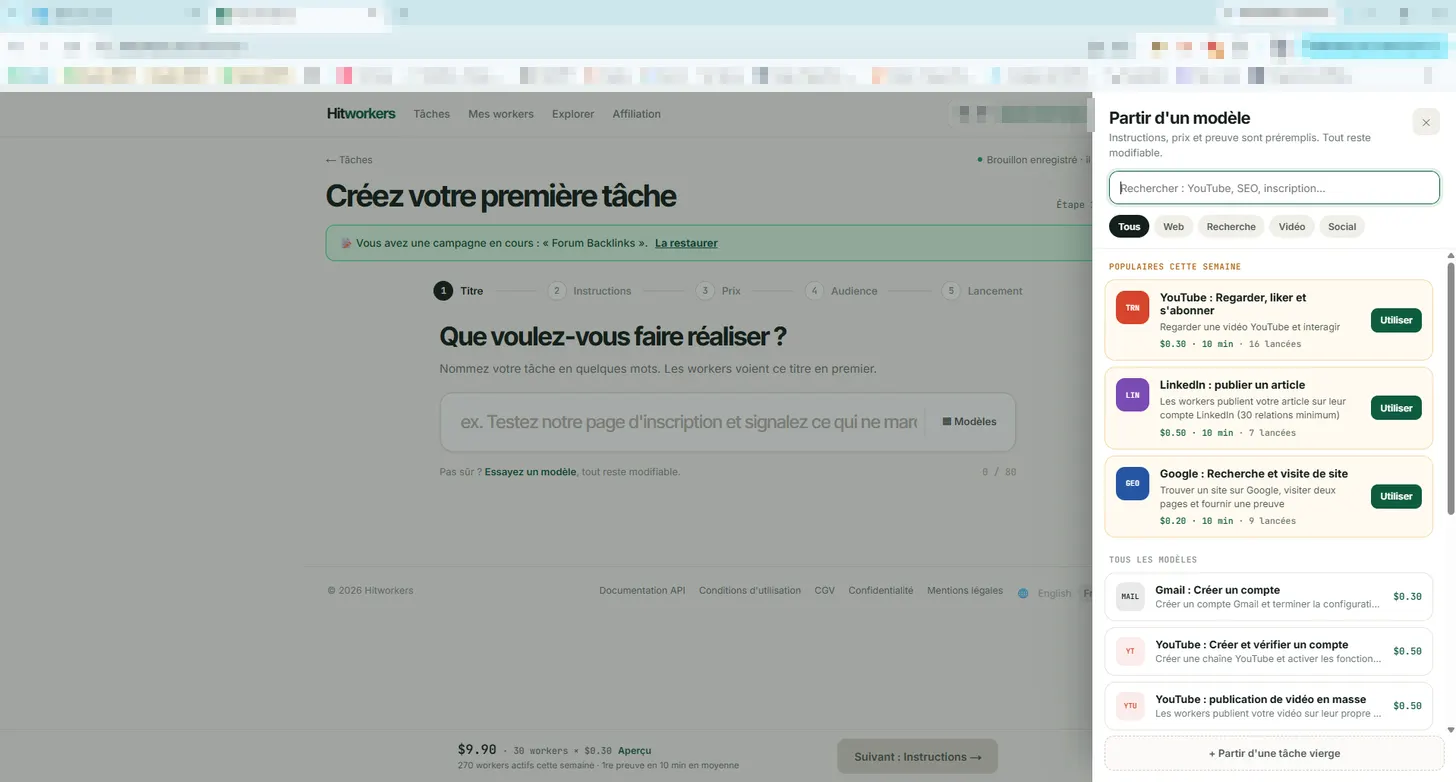
The templates screen shows the available campaign types side by side: TRN (YouTube watch and subscribe), LIN (LinkedIn publish), GEO (Google search), MAIL (Gmail account creation), YT (YouTube channel creation) and YTU (YouTube publishing), alongside other codes used across the platform such as FOR for forum backlinks, YTC and GCT for click-through rate work, and PAR for parasite SEO placements. Picking a template pre-fills the instructions and proof type, which is a reasonable starting point as long as you edit the wording to match your actual goal rather than launching the default text as is.
Step 3: How does pricing work in practice?
Price is set per task, and the displayed cost already includes the platform fee. The example shown on the dashboard is a $9.90 campaign built from 30 workers at $0.30 each, with a 10% fee folded into that total, so there's no separate fee line to calculate yourself.
For reference, the public pages list forum links starting at $0.50 per link (proof being the message URL, login and a screenshot) and thumbnail tests from $0.10 per vote, where real viewers pick a thumbnail and explain why. Our full breakdown of what a campaign really costs goes deeper into how these numbers scale once you move past the minimum batch.
| Step | What you set | Why it matters |
|---|---|---|
| Title | Internal campaign name | Organizes your dashboard, not shown to workers |
| Instructions | Exact action + proof format | Determines proof quality more than anything else |
| Price | Per-task rate, fee included | Example: $9.90 for 30 workers at $0.30 each |
| Audience | Who can pick up the task | Narrower targeting usually means slower fill |
| Launch | Goes live to active workers | At the time of our test, 270 active workers were reported that week |
Step 4: What does the audience step actually control?
Audience settings narrow down who can see and accept your task. The platform advertises workers in 190+ countries, so without any filtering a task can be picked up from almost anywhere, which is fine for generic clicks but a problem if you need a specific country for a geo-targeted search task.
The tighter you set this, the smaller your pool of eligible workers, which can slow down how fast tasks fill. There's no public data on fill speed by country, so treat audience targeting as a trade-off between relevance and speed rather than something you can predict exactly.
Step 5: Launch, and the temporary minimum worth knowing about
Once everything above is set, launch makes the campaign visible to workers. On the account we tested, a banner on 08/11 stated the usual 30-worker minimum was temporarily dropped to 10 for 7 days, alongside a note that 270 workers were active that week with proofs typically coming in within about 10 minutes on average.
That minimum won't necessarily stay at 10, so if you're reading this after the promotional window, expect the floor to return to 30 unless a new banner says otherwise. Either way, the launch step itself doesn't ask for anything new, it just confirms the budget and audience you already set.
How do you approve proofs without wasting the whole batch?
Proofs come in against the rules you set at step 2, so the first filter is simply re-reading your own instructions before you start approving or rejecting. Pay attention to whether the proof format matches exactly what you asked for (screenshot, URL, timestamp) rather than approving on a quick glance.
The platform states that rejected work is refunded, which removes some of the pressure to approve borderline submissions just to avoid losing the spend. If you consistently reject a specific type of proof, that's usually a sign the instructions were ambiguous rather than that workers are cutting corners, worth rewriting the brief before relaunching rather than repeating the same campaign as is.
Should you use a promo code when you launch?
If you use a promo code at signup or on your first deposit, the advertiser gets +5% credits on payments. We're transparent about this: the code we use, CHICO5, also changes our own commission on your account from 12% down to 7%, so we'd rather you know that trade-off upfront than discover it later. You can read the exact mechanics on our promo code page before deciding whether the extra credits are worth it for your situation.
Is this better than building the brief yourself from scratch?
Templates save time on structure, not on judgment. They set the right fields (proof type, default price, audience hints) but the actual wording of your instructions is still on you, and that's true whether you're testing a thumbnail, buying a YouTube CTR style campaign, or running a Google CTR task.
If you're still comparing whether Hitworkers is the right tool for this at all, our comparison with Microworkers and our page on the company behind the platform cover the parts this tutorial doesn't.
FAQ
How long does it actually take to launch a campaign on Hitworkers?
The dashboard advertises 3 minutes starting from a template, and the five-step flow (title, instructions, price, audience, launch) supports that if you already know what you want workers to do. Writing a solid brief usually takes longer than the form itself.
What's the minimum number of workers per campaign?
The standard minimum is 30 workers, but a banner we saw on 08/11 temporarily lowered it to 10 for a 7-day window. Check the dashboard at the time you launch since promotional minimums can change.
Do I need to write my own instructions or can I just use a template?
Templates like TRN, LIN, GEO or MAIL pre-fill a default instruction block and proof type, but editing that text to match your exact goal is what prevents messy or disputed proofs. Treat the template as a draft, not a final brief.
What happens if I reject a proof?
According to the platform, rejected work is refunded, so you're not paying for proofs that don't meet your stated rules. This also means there's no financial reason to approve a submission you're not confident about.
Does the displayed price include fees?
Yes, the price shown when building a campaign already includes the 10% platform fee, as shown in the $9.90 for 30 workers at $0.30 each example on the dashboard.
Can I target workers from a specific country?
Yes, the audience step lets you narrow who sees your task, and the platform states it has workers in 190+ countries overall. Narrower targeting can mean a slower fill since you're drawing from a smaller pool.
Should I use the CHICO5 promo code when I sign up?
It gives you, the advertiser, +5% credits on your payments, which is a direct benefit regardless of who referred you. We disclose that it also lowers our own commission from 12% to 7% on your account, since we'd rather be upfront about that than not mention it.
Sources
- Hitworkers advertiser dashboard (screenshots) — relevé le 08/11/2026
- Hitworkers public pricing and proof pages — relevé le 08/11/2026
- Microworkers FAQ — relevé le 08/11/2026